
About
An environment variable is an operating system variable that use the hosted application to set application parameters.
They can be set on different scopes:
- for a shell thread with the set DOS command (ie for a specific process)
- for a specific user
- global for a system
How to manage an environment variable ?
DOS
Registry
- System: HKEY_LOCAL_MACHINE\SYSTEM\CurrentControlSet\Control\Session Manager\Environment
- User: HKEY_CURRENT_USER\Environment
GUI
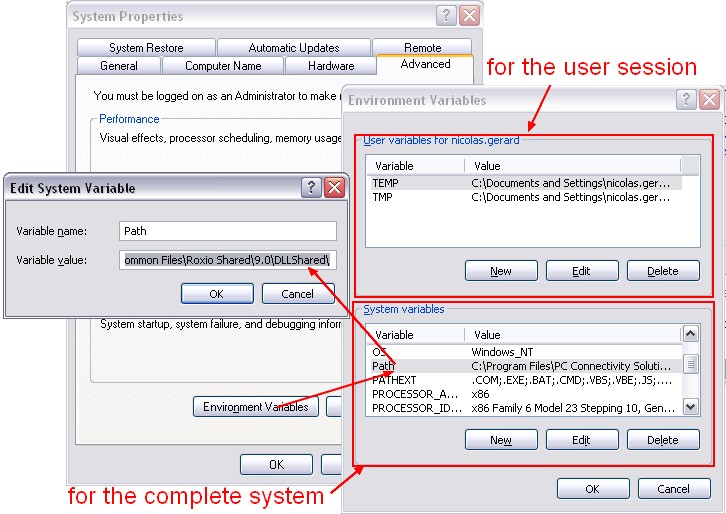
- Start / Control Panel / (Performance and Maintenance for XP) / System
- In the Advanced tab, click the Environment Variable button
- You can enter a environment variable for:
- a user session
- of for the complete system (also known as a global environment variable)
List
Example: listing of the environment variable of the Outlook process (application) within Process explorer
See process environment variable

Built-in Environment variable
| %PATH% | list of directories where the OS search to find executable binary. See Os - (Search) Path Environment Variable |
| %temp% | Temp Directory |
| %SYSTEMDRIVE% | Disk Drive |