About
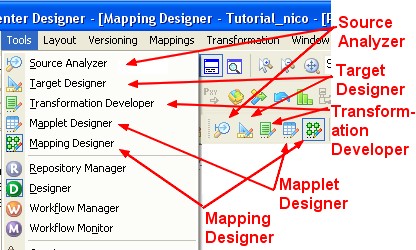
The Designer has the following tools that you use to analyze sources, design target schemas, and build source-to-target mappings:
- PowerCenter - Source Analyzer. Import or create source definitions.
- PowerCenter - Target Designer. Import or create target definitions.
- PowerCenter - Transformation Developer. Develop transformation to use in PowerCenter - Mapping. You can also develop user-defined functions to use in expression.
- PowerCenter - Mapping Designer. Create mapping that the integration service uses to extract, transform, and load data.
Articles Related
Designer Panel
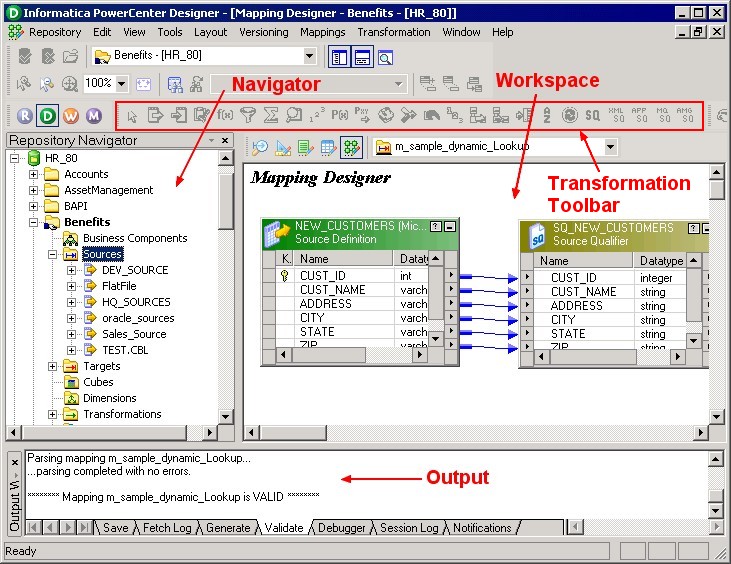
You can display the following windows in the Designer:
- Navigator. Connect to repositories, and open folders within the Navigator. You can also copy objects and create shortcuts within the Navigator.
- Workspace. Open different tools in this window to create and edit repository objects, such as sources, targets, mapplets, transformations, and mappings.
- Output. View details about tasks you perform, such as saving your work or validating a mapping.
- Transformation Toolbar : PowerCenter - Transformations
Support
The navigator doesn't appear anymore
When you are going from two screen to only one, you may lost your Navigator when using docking. To retrieve your navigator, just suppress the following registry map:
HKEY_CURRENT_USER\Software\Informatica\PowerMart Client Tools\8.6.1\Designer