
About
RPM are packages file that you can install on Linux system.
This package format was created by Red Hat and standardized by the LSB.
It's widely adopted, including in openSUSE.
They are .cpio files and you can unpack their contents.
If you don't have them, you can find them via rpmfind
They are managed through a package manager.
Articles Related
Package naming scheme
The naming scheme of RPM files is itself a standardized convention. RPMs have the format
(name)-(version)-(build).(platform).rpm.
For example, the name cat-2.4-7.i386.rpm would mean an RPM :
- for the utility “cat”
- version 2.4, build 7
- for the x86 (When the platform name is replaced by “src”, it's a source RPM)
How to
install them
Via the shell
You install them with a package manager.
With yum
yum install packageName
Gnome gui
On Red Hat / Oracle Entreprise Linux
With the Gnome gui
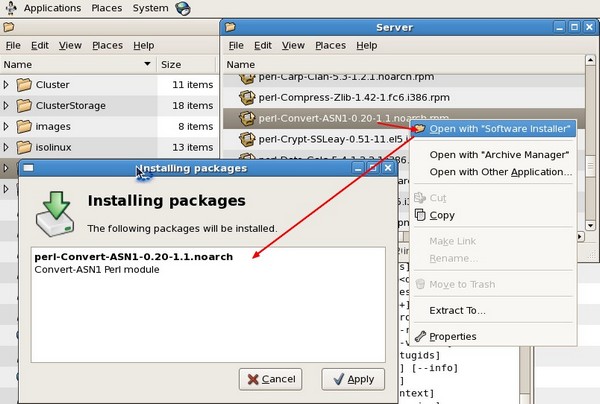
user scope
unzip them.
RPM packages are .cpio files, and you can unpack their contents with the cpio utility.
rpm2cpio my.rpm | cpio -idv
See if a package is already installed
Use your package manager list function.
For instance, for checking if a package is installed or to find out all packages that match a string is with the rpm tool
rpm -qa | grep -i python
where:
- q = query
- a = all
deinstall a package ?
From the command above, take the package name (without the architecture and rpm extension) and perform the following command
rpm -e package
where:
- e = erase
Documentation Location
The location of the documentation for installed packages is: /usr/share/doc
For example, the documentation for the redhat-config-date software package is located in /usr/share/doc/redhat-config-date-
''List a package or groups of packages
yum list
First find the name of your package
yum list name
Then list the installed content
rpm -ql packageName
# example
rpm -ql sqlite.x86_64
/usr/bin/sqlite3
/usr/lib64/libsqlite3.so.0
/usr/lib64/libsqlite3.so.0.8.6
/usr/share/doc/sqlite-3.7.17
/usr/share/doc/sqlite-3.7.17/README
/usr/share/man/man1/sqlite3.1.gz
yum info python
Loaded plugins: rhnplugin, security
This system is not registered with ULN.
ULN support will be disabled.
Installed Packages
Name       : python
Arch       : x86_64
Version    : 2.4.3
Release    : 56.el5
Size       : 73 k
Repo       : installed
Summary    : An interpreted, interactive, object-oriented programming language.
URL        : http://www.python.org/
License    : PSF - see LICENSE
Description: Python is an interpreted, interactive, object-oriented programming
           : language often compared to Tcl, Perl, Scheme or Java. Python includes
           : modules, classes, exceptions, very high level dynamic data types and
           : dynamic typing. Python supports interfaces to many system calls and
           : libraries, as well as to various windowing systems (X11, Motif, Tk,
           : Mac and MFC).
           :
           : Programmers can write new built-in modules for Python in C or C++.
           : Python can be used as an extension language for applications that need
           : a programmable interface. This package contains most of the standard
           : Python modules, as well as modules for interfacing to the Tix widget
           : set for Tk and RPM.
           :
           : Note that documentation for Python is provided in the python-docs
           : package.
Find what package provides the given file
yum provides *GLIBCXX_3.4.8*
libstdc++-4.1.2-50.el5.i386 : GNU Standard C++ Library
Repo        : ol5_u6_base
Matched from:
Other       : libstdc++.so.6(GLIBCXX_3.4.8)
rpmrebuild can be used to:
- build an rpm file from an installed package (lost rpm)
- or to quickly make change to a package: just have your change on installed files and call rpmrebuild.